
問題
MCP C# SDK 2.0 已經 Release 了,所以就將專案的MCP套件升級上去,並透過 npx @modelcontextprotocol/inspector 來進行測試。
跑起來後,呃~ 怎麼整個 UI 都改了。
以前只能測試一個 MCP Server ,現在可以讓我們設定多個 Server。
於是將專案跑起來,並加入local的設定,讓它連接,卻出現fetch-failed的錯誤。
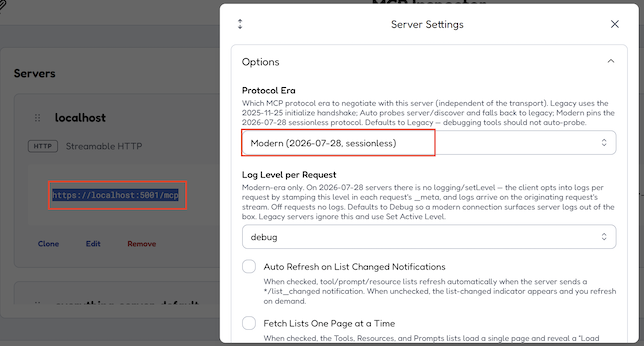
網路的Log如下,
1 | {"ts":1785384201448,"messages":[{"component":"InspectorClient","category":"transport","fetchRequest":{"url":"https://localhost:5001/mcp","method":"POST","headers":{"accept":"application/json, text/event-stream","content-type":"application/json","mcp-method":"server/discover","mcp-protocol-version":"2026-07-28"},"body":"{\"jsonrpc\":\"2.0\",\"id\":\"server-discover-probe-1\",\"method\":\"server/discover\",\"params\":{\"_meta\":{\"io.modelcontextprotocol/protocolVersion\":\"2026-07-28\",\"io.modelcontextprotocol/clientInfo\":{\"name\":\"mcp-inspector\",\"version\":\"0.0.0\"},\"io.modelcontextprotocol/clientCapabilities\":{\"sampling\":{},\"elicitation\":{\"form\":{},\"url\":{}},\"roots\":{\"listChanged\":true},\"tasks\":{\"list\":{},\"cancel\":{},\"requests\":{\"sampling\":{\"createMessage\":{}},\"elicitation\":{\"create\":{}}}},\"extensions\":{\"io.modelcontextprotocol/tasks\":{},\"io.modelcontextprotocol/ui\":{\"mimeTypes\":[\"text/html;profile=mcp-app\"]}}}}}}"},"fetchResponse":{"error":"fetch failed"}},"transport fetch"],"bindings":[],"level":{"label":"info","value":30}} |
解法
在 Fetch 就失敗了,改用 HTTP 就可以了。
那為什麼 HTTPS 會失敗呢? 先用 node fetch 試看看,開啟cmd,執行以下的命令
1 | node -e "fetch('https://localhost:5001/.well-known/oauth-authorization-server').then(r=>r.text()).then(t=>console.log('OK:',t.substring(0,100))).catch(e=>console.error('FAIL:',e.cause||e))" |
它會發生self-signed certificate的錯誤,如下,
1 | FAIL: Error: self-signed certificate; if the root CA is installed locally, try running Node.js with --use-system-ca |
那如果要走 HTTPS 呢? 那可以將開發憑證加到Node 的信任清單中,如下,
- cmd.exe
1
2
3
4
dotnet dev-certs https --export-path "%USERPROFILE%\aspnet-dev.pem" --format PEM
set NODE_EXTRA_CA_CERTS=%USERPROFILE%\aspnet-dev.pem
npx @modelcontextprotocol/inspector
注意:環境變數要和
npx在同一個視窗依序執行,Inspector 已在跑的話要重開。
也就是之後每次跑 inspector 都要跑
1 | set NODE_EXTRA_CA_CERTS=%USERPROFILE%\aspnet-dev.pem |
如果要永久設定的話,可以改用setx NODE_EXTRA_CA_CERTS “%USERPROFILE%\aspnet-dev.pem”
設定完成後,可以再跑上述的node -e "fetch 進行測試。